Micro Emacs for the terminal
mg is a small, fast, and portable Emacs-like editor for people who
cannot, or would rather not, run the real thing. It keeps the GNU Emacs
key bindings, so there is no second flavour to learn, and it builds with
nothing but a C compiler. Like its ancestors it is in the public domain.
This project is derived from, and tracks, OpenBSD Mg, adding usability features while staying friendly to resource constrained systems.
Features
- Emacs key bindings, with a quick help card on
C-h qand a tutorial onC-h t, both built into the binary - Syntax highlighting for C and C++, shell, make, python, markdown,
YAML, configuration files, diffs, and git commit messages. The mode
follows the file, and
M-x font-lock-modeturns the colours off - UTF-8 in UTF-8 locales: multibyte text is typed, displayed, and edited as characters, and double-width CJK takes the two columns it is drawn in
- Visual mark mode, where the region between mark and dot is shown in reverse video, and shift-select with the arrow keys and PgUp/PgDn
- Side by side windows with
C-x 3, moving between them with the Meta arrow keys, resizing with Meta-Shift, andC-x +to balance - Line wrap, so a long line continues on the rows below instead of
running off the edge. Off by default,
set-default-mode wrapin~/.mgturns it on - Smart Tab that indents the line, or the region when the mark is active, in the language modes that have an opinion about indentation
- Builds without curses, on termios and escape sequences alone, for systems where terminfo is too much
- Reads
tagsfiles, opens gzipped text read-only, and keeps an Emacs style modeline with(row,col)and the major mode
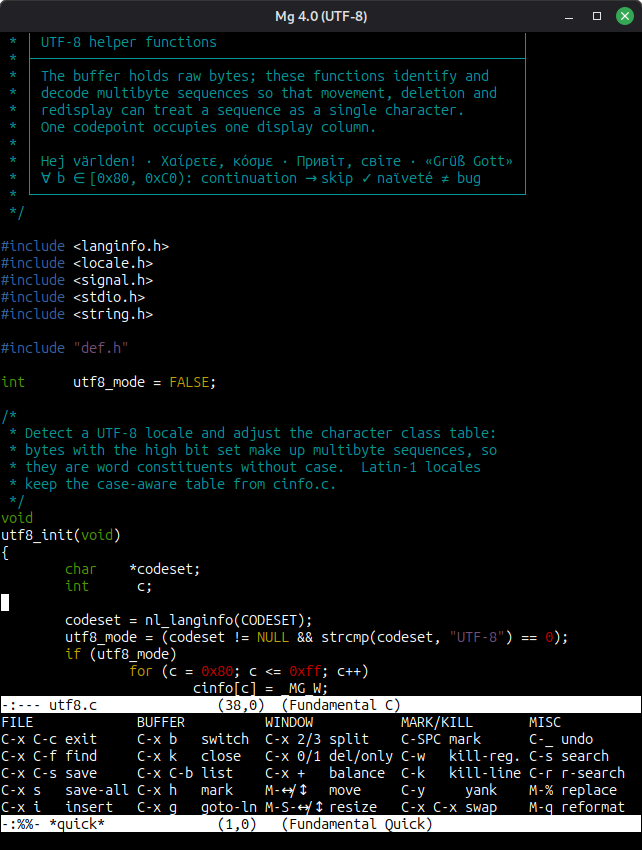
Mg editing its own source, with the quick help card below
Language Modes
A mode is picked from the file name, or from the #! line when there
is one, and decides both the colours and how the buffer behaves. A
makefile gets hard tabs because recipes need them, python and YAML get
spaces because a tab is a syntax error there, and a commit message gets
the keys for finishing, cancelling, and signing off.
Add your own in ~/.mg:
auto-execute *.rst text-mode
auto-execute *.lua shell-script-mode
Keys
Emacs notation throughout: C- is Control, M- is Meta, which today
is Alt or a tap on Esc. So C-x C-c means hold Control and tap
x then c, and C-h q means hold Control and tap h, release, then
tap q.
If you have never used Emacs, C-h t opens the tutorial and walks you
through it.
Get It
Latest release available on GitHub
Releases ship a tarball and a Debian package, mg2a, for amd64. The
tarball has a configure script, so a C compiler and make are all you
need; a clone from GitHub needs ./autogen.sh first.
There is also a container image, with ~/.mg and the tutorial working
when $HOME is mapped to /root:
docker run -ti -v $HOME:/root ghcr.io/troglobit/mg:latest
Origin & References
Mg is a Micro Emacs clone created in 1987, based on the MicroEMACS
v30 that Dave Conroy released in 1985. The name, “Micro GNU Emacs”, was
disputed early on by the FSF, so today it simply goes by mg.
The OpenBSD tree has carried the best maintained version of it for years, and this project follows that tree, porting the fixes back and developing the parts a terminal editor wants in 2026. Unlike most ErsatzEmacs clones it aims at compatibility with GNU Emacs rather than at a dialect of its own.
The code is free of any licence at all: it is in the public domain.