This is a very short blog post, mostly intended as a reminder to myself. Basically, there are two methods of adding multicast routing support to the FreeBSD kernel:
Rebuild the kernel with options MROUTING Load the kernel module: kldload ip_mroute The kernel rebuild assumes the src.txz set was installed previously.
cd /usr/src cd sys/amd64/conf cat GENERIC | sed 's/GENERIC$/MULTICAST/' > MULTICAST echo 'options MROUTING # Multicast routing' >> MULTICAST echo 'options PIM # Enable for pimd' >> MULTICAST cd - make kernel KERNCONF=MULTICAST reboot That’s it.
With lots of help from the tireless Tobias Waldekranz, I think I’ve finally found the perfect “magit like” email setup. With Emacs, of course. This is the story of how I did it.
First install notmuch, mbsync (from the isync package), and afew:
sudo apt install notmuch isync afew Do initial setup of notmuch for your user. I’ve opted to store my mail in ~/mail, this is used throughout the text below, ymmv.
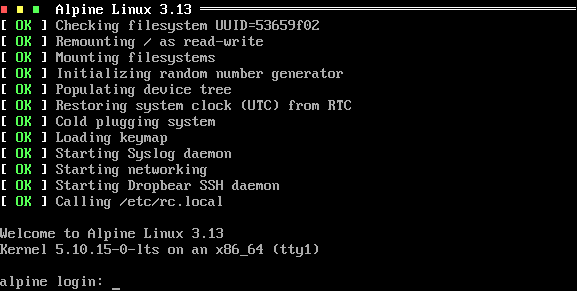
Alpine Linux is an amazing little operating
system. It’s small, boots quick, and easy to use. The size alone makes
it very attractive to container builders.
Alpine Linux started with Finit
This blog post details how to set Alpine up with the Finit init system,
replacing the default OpenRC.
I blogged earlier about the awesome little ThinkPad X200 I found and its blinking WiFi LED. Briefly I mentioned an odd issue with X/Wayland on LMDE 4. This turned out to be a HW bug that can only be worked around by disabling hardware acceleration for virtualization:
https://forums.lenovo.com/t5/Windows-8-1-8-7-Vista-and-XP-Discussions/Bizarre-screen-artifacts-on-R400-Integrated-Graphics-running-Win-7-RTM/m-p/153980?page=1#199768
The post says it should be sufficient to “Disable Virtualization Technology for Directed-IO (VT-d)”, but that didn’t work for me, and I wanted to keep the 8 GiB of RAM I managed to fit into it.
Reminder to self: you need to set up the PKG_PATH to the correct FTP URI. Also, use the correct ARCH, otherwise the installer complains. Do not use amd64, but rather x86_64.
Here it is, you’d think this be something the installer could set up a default for …
PKG_PATH=http://ftp.netbsd.org/pub/pkgsrc/packages/NetBSD/amd64/6.1.5/All/ or if you use the latest on an old ThinkPad T42:
PKG_PATH=http://ftp.netbsd.org/pub/pkgsrc/packages/NetBSD/i386/9.0/All/ The simply
pkg_add -v git Or so you might think!
For a while now my Wireguard VPN provider has been handing out a bad DNS
server. So whenever I do a DNS lookup it takes five (5!) seconds timing
out, which is quite annoying.
This blog post is about how you can fix this with openresolv in Ubuntu.
The upcoming v2.32 release of Merecat supports HTTPS as well as
serving more than one Internet port. This is highly useful for those
who want to serve both HTTPS and HTTP content.
Update: now with support for --webroot and HTTP-01 renewal!
Mounting my ReadyNAS from Nautilus stopped working after upgrading to
Ubuntu 20.04. Turns out there was a change in behavior in Sambva v4.11
that disabled SMB1 protocol by default. It’ll be interesting to see how
this pans out in the rest of the Linux community … fortunately there’s
a workaround!
Update: same on Debian 11 (bullseye) and Linux Mint 20 (Ulyana)
The last couple of months have been crazy. The downturn in the economy
due to Covid-19, mass layoffs, social distancing and quarantine. Not
to mention the unrest in US and Europe in the wake of George Floyd’s
uneccessary death.